Android mobile phones come with very useful and simple tools that allow conducting a search using only an image. Thanks to them you are able to find almost everything online and you don’t have to know the name or any other data related to this thing/person/brand/event.
All the methods of reverse image searching recommended in this article are easy to perform, so it’s up to you to choose the one that fit your current needs:
- When you want to find similar images to the one you have found on some website, use Google Chrome
- When you want to find the name of something around you or a similar thing, use Google Lens
- When you want to find some specific information on a given photo, use specialized applications that allow reverse image searching (e.g. PimEyes allows you to find where your face appears online).
Important: These instructions apply only to a reverse image search from Android (conducted on an Android smartphone).
Reverse image search on Android using Google Chrome
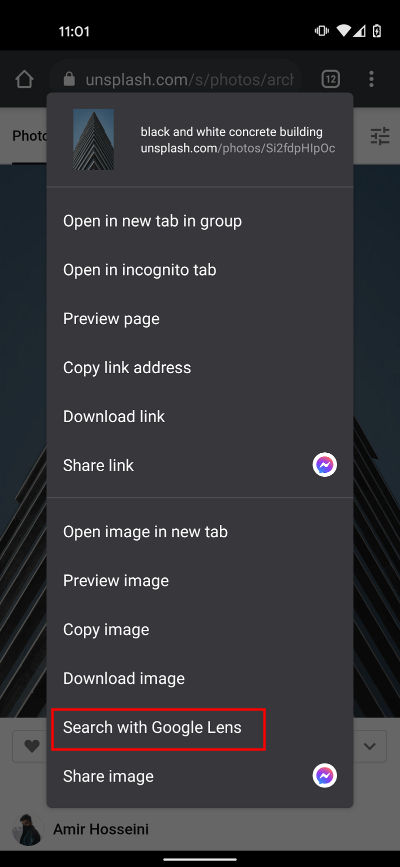
Google Chrome is the default browser on Android. When you surf the Internet and come across an interesting photo or some kind of graphics, you can easily find similar images using the Google Chrome app. The only thing you need to do is to tap and hold the picture that you have found on Google Chrome and when the options open, click the “Search with Google Lens” button. This action will open the Google Lens app - Google’s default image recognition tool.
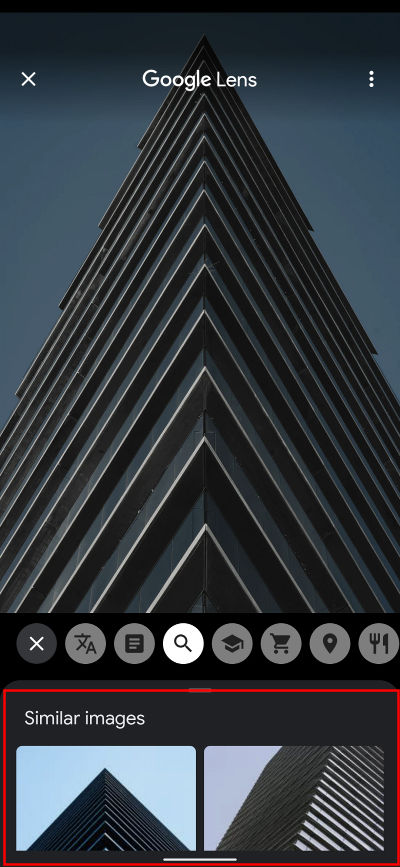
You are now redirected to the Google Lens app. Below the photo you have used to perform this search, there is the “Similar images” section. You can now search for related pictures.
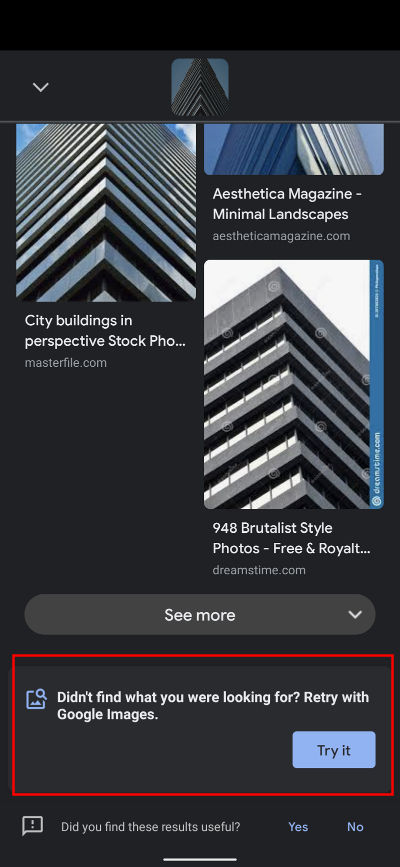
If you haven’t found the right image, you can then use Google Images to perform a more extended search (Lens suggests that at the end of the results). Google Images is rather a desktop solution, but you can also use it on mobile devices. You can find out more about using Google Images from the article on our blog.
How to reverse image search using Google Lens
As we mentioned before, Google Lens is a type of image recognition technology that identifies objects using visual analysis and displays pictures of related items. It is installed in all modern models of Android phones. You can also download it from Google Play.
Using Google Lens is very simple: just take a picture of something with your camera. In the results you receive the name of the object from the photo and a list of similar images. Google Lens can also be used to recognize texts, places, food, products, bar codes, or exercises (the “Homework” option).

Reverse image search on Android using 3rd party applications
A reverse image search by phone can also be performed using external applications. There are 2 popular apps on Google Store (Search By Image and CamFind), but as they are rarely updated, we can’t recommend them. There are also a few reverse image search engines that allow looking for similar pictures: Yandex Images, Bing Visual Search, TinEye.
They are all desktop applications, but they can be used to reverse image search by phone.
Android phone reverse image search for faces
The reverse image search mechanism is also used in specialized tools that are focused on some part of a picture. One of them is PimEyes - the search engine that allows finding your face on the Internet. The way PimEyes works is really simple: you upload or take a picture of yourself and in the results you receive a list of photos linked to websites where similar faces appear. PimEyes’ site is adjusted to mobile, so you can easily use it on your phone.